
How Business Automation Saves 40+ Hours Weekly (2026 Complete Guide)
Business automation isn’t a luxury anymore – it’s become essential for small businesses competing in an increasingly fast-paced market. If your team is drowning in manual work, spreadsheet chaos, and approval bottlenecks, automation can reclaim weeks of productivity every month.
This guide walks you through what modern automation looks like, the real ROI you can expect, and how to know if your business is ready to automate.
Estimated reading time: 15 minutes
Table of contents
- How Business Automation Saves 40+ Hours Weekly (2026 Complete Guide)
- What is Business Automation – And Why 2026 is the Year to Start
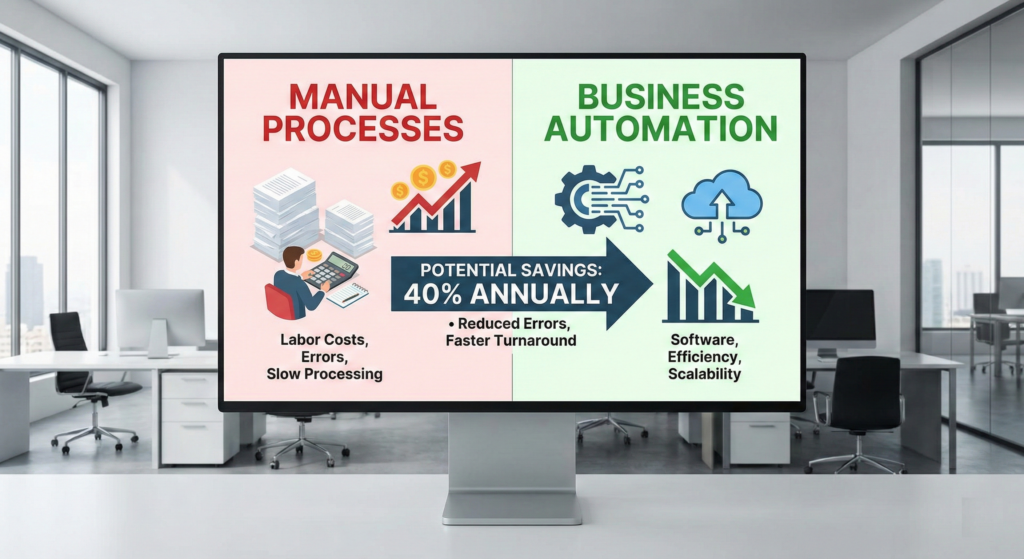
- The Hidden Cost of Manual Processes: What You’re Really Paying
- How Modern Automation Actually Works (It’s Not Scary)
- Real ROI: What Automation Actually Saves Businesses
- The 2026 Automation Landscape: What’s Actually Possible Now
- Pain Points Your Business Likely Has (And Automation Solves)
- Is Your Business Ready to Automate? A Simple Assessment
- How to Start Small and Scale Smart
- The Human Element: Why Automation Doesn’t Mean Job Loss
- Common Automation Mistakes (And How to Avoid Them)
- How to Measure Success: Beyond “Time Saved”
- The Bottom Line: Automation is Now Within Reach
- Ready to See What Automation Could Actually Save?
What is Business Automation – And Why 2026 is the Year to Start
Business automation uses technology to execute repetitive, rule-based tasks without human intervention. Instead of your team manually entering data, sending approval emails, or reconciling reports, the system does it for you – 24/7, with fewer errors.
In 2026, automation looks fundamentally different from ten years ago. The old image of “robots replacing jobs” has evolved into something more powerful: collaborative automation, where digital systems handle routine work so your team can focus on strategy, customer relationships, and growth.
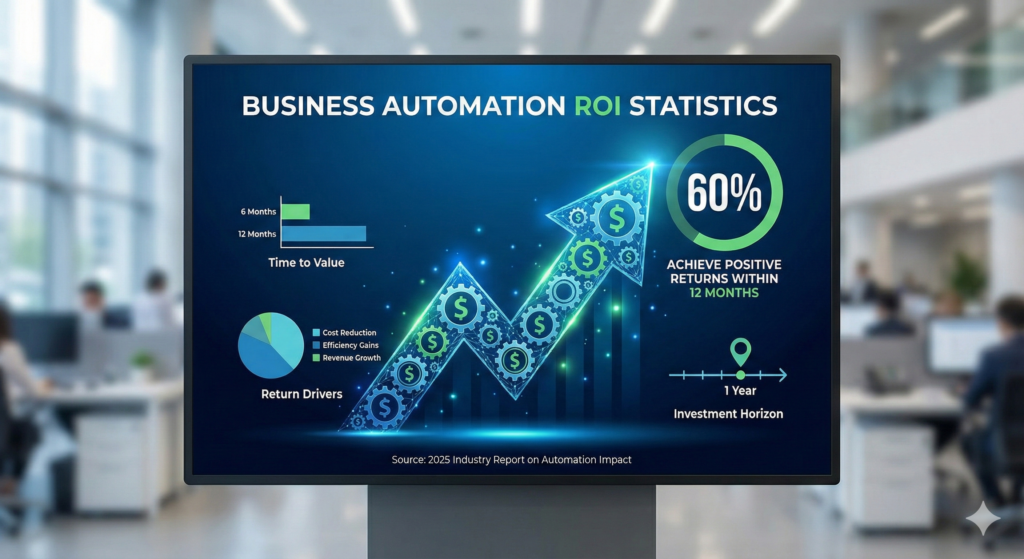
The numbers tell the story. According to 2026 research, 60% of organizations achieve positive ROI within 12 months of deploying workflow automation. That’s not a distant future promise – that’s today’s reality. On average, companies see 25-30% productivity gains in automated processes, error rates drop by 40-75%, and employees report 15-35% higher job satisfaction when freed from repetitive tasks.
For small businesses specifically, the impact can be even more dramatic. A services company automating their operational workflows can reduce founder involvement by 65%, cut manual work in half, and achieve near-perfect infrastructure uptime – while scaling without hiring proportionally more staff.

The Hidden Cost of Manual Processes: What You’re Really Paying
Most small business owners don’t calculate the true cost of doing things manually. You see the payroll expense, but you miss the friction.
Here’s what repetitive manual work actually costs:
Time waste at scale. Your operations manager spends two hours daily reconciling data across systems. Your sales team manually updates your CRM instead of calling customers. Your finance person hand-enters invoices into QuickBooks. These don’t sound like much individually, but multiply that across a team over a year:
- 2 hours/day × 250 working days = 500 hours annually
- At $25/hour loaded cost = $12,500 per person per year
- For just three people doing admin work: $37,500 in pure productivity drag
Error compounding. Manual data entry has a documented error rate of 1 in 300 keystrokes. When invoices are wrong, customers delay payment. When approval chains break, deals stall. When inventory records are inaccurate, you stock the wrong products. These errors don’t just cost time to fix – they cost revenue, customer trust, and compliance risk.
Founder/key person bottleneck. You can’t grow faster than you can personally manage. If you’re the one approving every workflow or knowing where critical information lives, your business is capped at your personal capacity. Automation creates the first true separation between your business’s growth and your individual workload.
Speed disadvantage. Manual processes take days. Automated processes take minutes. Your competitor who responds to a customer inquiry in an hour while you need a day is slowly winning market share. Decision velocity—how fast you can turn insight into action—is becoming the new competitive advantage.
How Modern Automation Actually Works (It’s Not Scary)
The phrase “business automation” might conjure images of complex robots or months of IT projects. The reality is much friendlier.
Modern workflow automation typically involves three things:
1. Identifying the right processes to automate. Not every task should be automated. The best candidates are:
- Repetitive (happens the same way every time)
- Frequent (happens multiple times weekly or daily)
- Rule-based (has clear, logical rules: “if X happens, then do Y”)
- Cross-system (moves data between your tools)
Examples: invoice approvals, customer onboarding, lead qualification, order routing, compliance documentation, employee scheduling.
2. Designing the workflow logically. Before building, you map what the process actually looks like: What triggers it? What decisions are made? Who approves? Where does information flow? This is often where companies find hidden inefficiencies—the workflow design itself reveals that step seven is redundant, or step three never actually happens.
3. Building it once, running it forever. Once designed, the automation runs reliably every time. No more “oh, I forgot to email that vendor” or “that step slipped through the cracks.” Consistency improves, errors drop, and your team gets their time back.
The key difference in 2026 is that automation platforms are now low-code or no-code. Business teams can often configure workflows themselves using visual interfaces rather than waiting for IT to code it. This speeds implementation from months to weeks.
Real ROI: What Automation Actually Saves Businesses
Let’s move past marketing promises and talk about measurable financial impact.
Time savings are the most obvious metric. Organizations report:
- Document automation reduces creation time by 75-90%
- Automated invoice processing cuts cycle time from 2-3 days to 4 hours
- Employee scheduling automation eliminates 75% of scheduling time
- Customer support automation reduces response time from hours to minutes
For a mid-sized Phoenix business (20-50 employees), this often translates to 5-15 hours saved weekly at the starter level, or 15-30+ hours at mid-tier, or 40+ hours at enterprise scale.
Cost savings compound from time recovery. If your team recovers 20 hours weekly and your loaded labor cost is $50/hour, that’s:
- 20 hours/week × 50 weeks/year = 1,000 hours
- 1,000 hours × $50 = $50,000 annual productivity recovery
That’s the salaries-and-benefits cost of a full-time employee—recovered by automating just one set of workflows.
Error reduction creates hidden savings. When manual invoice entry drops error rates from 2% to 0.2%, that’s fewer corrections, faster payment processing, fewer customer disputes, and better cash flow. Error-related costs are often harder to quantify but frequently equal or exceed time savings.
Compliance and risk reduction matters, especially in regulated industries. Automated workflows create perfect audit trails, enforcing consistent processes and reducing regulatory risk. For companies in financial services, healthcare, or government contracting, this is not a nice-to-have—it’s a business requirement.
The realistic timeline: 60% of organizations see ROI within 12 months. Many see it faster—within 3-6 months for high-impact automations. The businesses that struggle are those expecting changes in week one (realistic: week 4-6) or those automating low-impact processes (realistic: measure carefully before building).
The 2026 Automation Landscape: What’s Actually Possible Now
If the last time you heard about automation was 2020, the landscape has shifted significantly.
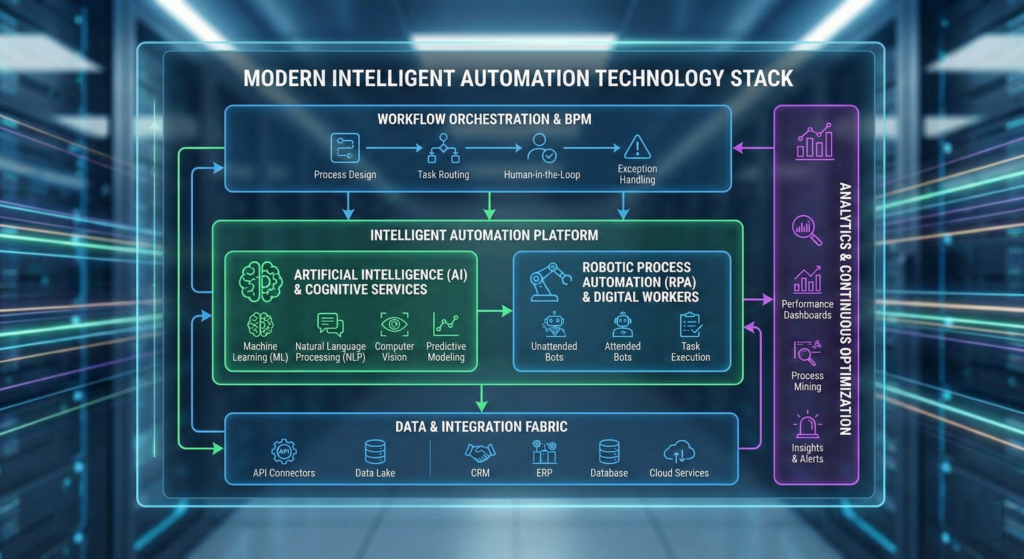
Hyperautomation is the new standard. Instead of automating a single workflow, modern platforms integrate end-to-end systems: RPA (robotic process automation) for repetitive steps, AI for decision-making, data analytics for insights, and workflow orchestration to connect everything. This means your automation can not only execute known processes but also learn from exceptions and adapt.
AI-powered decision intelligence replaces rigid rule-based systems. Old automation said “if invoice is over $10,000, require three approvals.” Modern automation says “analyze historical approvals, invoice characteristics, and vendor behavior to predict approval risk and route intelligently.” The system learns and improves over time.
Low-code platforms mean smaller teams can implement faster. Companies like n8n, Make, and Zapier (or enterprise equivalents like UiPath) let business users build complex workflows without writing code. This democratizes automation—you’re not waiting for IT anymore.
Intelligent document processing (IDP) extracts data from emails, forms, contracts, and invoices with AI-powered accuracy. Instead of your team transcribing purchase orders, the system reads them, validates them, and routes them—catching errors humans would miss.
Process mining shows you where you’re actually wasting time. These tools analyze your system logs and activity data to create visualizations of your real workflows. You often discover that the process you think happens is different from what actually happens, and there are bottlenecks hiding in plain sight.
Autonomous systems beyond manufacturing now extend into logistics, finance, HR, and customer service. AI-driven robots manage warehouse inventory, autonomous fraud detection systems scan transactions 24/7, and chatbots handle routine customer support—all without human intervention.
For small businesses, this means: you’re not choosing between expensive enterprise software or building custom code. You’re choosing between platforms that let you assemble automation quickly and affordably, with built-in security and compliance.
Pain Points Your Business Likely Has (And Automation Solves)
Automation becomes urgent when you hit one of these situations:
The founder dependency trap. Everything runs through you. No one else knows which vendors to contact, which approval process takes priority, or how the custom spreadsheet works. You can’t take a vacation without the business stuttering. You want to grow but you’re maxed out personally.
Automation solves this by codifying knowledge. The workflow becomes the source of truth. New team members follow the workflow. You reduce yourself to exception handling, not execution.
Operational chaos from siloed systems. Your CRM doesn’t talk to your billing system. Your project management tool doesn’t sync with your calendar. Your finance team manually exports data from three places and recombines it in Excel. Nothing has a single source of truth.
Automation solves this by unifying systems. Data flows automatically between tools. Your team sees one integrated picture. Reporting becomes instant instead of painful.
Slow decision-making. It takes three days to know if a customer paid. It takes a week to understand which projects are profitable. You make decisions on gut feel instead of data because gathering the data manually is too time-consuming.
Automation solves this with real-time visibility. Dashboards update continuously. You see what’s happening right now, not what happened last week. Decisions accelerate.
Unacceptable error rates. Your team manually processes invoices and you catch errors after they’ve caused problems. Customer data gets entered wrong and causes fulfillment issues. Compliance reports have mistakes because they’re hand-created.
Automation solves this with consistency and validation. Workflows enforce rules. Exceptions get flagged immediately. Error rates drop to near-zero. Compliance becomes provable.
Inability to scale without proportionally hiring. To handle more volume, you’ve been hiring more people. But your labor costs grow faster than your revenue. You’re not improving margin—you’re just getting busier.
Automation solves this by separating volume from headcount. The workflow handles increased volume at no additional cost. You scale revenue without scaling payroll.
Is Your Business Ready to Automate? A Simple Assessment
Not every business needs automation, and not every process should be automated. Here’s how to think about readiness:
You’re ready if:
- You have documented processes (or can quickly document them)
- You have multiple people doing similar repetitive work
- Your systems have APIs or integrations available
- You have clear decision rules (“if X, then Y”)
- Your team is open to process changes
- You can articulate what success looks like (time saved, error reduction, speed improvement)
You should be cautious if:
- Your processes change constantly (automate after they stabilize)
- You don’t know what your current process actually is (map it first)
- Your systems are completely disconnected with no integration path
- The process only happens occasionally or has too many exceptions
- You lack basic data quality (garbage in = garbage out)
Good starting points are often:
- Order processing and approvals (high volume, clear rules, cross-system)
- Invoice processing (repetitive, rule-based, integrates with finance)
- Customer onboarding (high frequency, consistent steps, improves experience)
- Reporting and data compilation (time-consuming, rule-based)
- Lead qualification and routing (repetitive, clear criteria)
How to Start Small and Scale Smart
Most businesses shouldn’t attempt to automate everything at once. The successful approach is:
Phase 1: Identify high-impact quick wins (Week 1–2)
- Look for processes that consume the most time.
- Focus on high-frequency, rule-based work.
- Estimate the time saved per month.
- Prioritize by impact-to-effort ratio.
Phase 2: Design before building (Week 2–3)
- Map the current process exactly.
- Identify decision points and exceptions.
- Determine what success metrics are.
- Plan for how it integrates with your systems.
Phase 3: Implement one workflow (Week 3–6)
- Build and test thoroughly.
- Train your team.
- Run parallel (manual + automated) for 1–2 cycles to validate.
- Measure the actual impact.
Phase 4: Learn and iterate (Ongoing)
- Refine the workflow based on real-world results.
- Apply lessons to the next automation.
- Gradually expand scope and complexity.
- Build internal expertise so you’re not dependent on consultants forever.
Phase 5: Scale to enterprise (Months 3–12)
- Connect workflows into larger orchestrations.
- Integrate AI for smarter decision-making.
- Add real-time dashboards and visibility.
- Automate more complex, cross-departmental processes.
The key: start small, prove ROI quickly, and reinvest savings into the next wave. The first automation often pays for itself. Subsequent automations are often funded by previous efficiency gains.
The Human Element: Why Automation Doesn’t Mean Job Loss
There’s a fair concern: won’t automation eliminate jobs?
The 2026 data suggests the opposite, with nuance. While automation is expected to displace some roles, the net effect is positive. Technology has historically created new types of work while eliminating old types. Automation doesn’t mean “no jobs”—it means “different jobs.”
More specifically:
- Routine work disappears, but strategic work increases
- Employees freed from data entry can focus on customer relationships, analysis, and problem-solving
- New roles emerge: workflow designers, automation specialists, data analysts
- Job satisfaction typically increases (people prefer meaningful work over repetition)
- Companies that automate hire more overall because they can grow faster
For your team, automation means:
- Less tedium
- More leverage (they accomplish more per hour)
- More interesting work
- Better chance of career growth within your company
- Not getting outsourced or replaced
The businesses that struggle are those that automate in secret, then announce layoffs. The businesses that thrive are those that communicate: “We’re automating the tedious parts so you can focus on the parts that matter.” That’s a retention and culture play, not a cost-cutting play.
Common Automation Mistakes (And How to Avoid Them)
Mistake 1: Automating a broken process
You automate your current workflow, complete with all its workarounds and illogical steps. The waste now happens faster.
Mistake 2: Choosing the hardest process first
You pick something complex and poorly defined, implementation stalls, and you lose confidence in automation.
Mistake 3: Automating for automation’s sake
You automate something that should stay manual because it’s high-touch and relationship-driven.
Mistake 4: Deploying without change management
You build the workflow perfectly, but your team keeps doing things the old way out of habit.
Mistake 5: Implementing without integration
You automate a workflow that doesn’t actually connect to your other systems, so the data is still manual elsewhere.
Mistake 6: Setting unrealistic expectations
You expect week-one perfection. First run is messy. You declare automation a failure.
How to Measure Success: Beyond “Time Saved”
Not all automation metrics are equal. Here’s what actually matters:
Hard ROI (direct financial impact):
- Time saved per process × hourly cost × annual frequency = annual cost savings
- Reduction in error-related costs (rework, customer service time, compliance fines)
- Reduction in operational costs (storage, tools, manual oversight)
- Accelerated cash flow (faster invoicing = faster payment)
Example: Automating invoice processing saves 10 hours/week at $40/hour. That’s $20,800/year. If you’re spending $5,000/year on the automation platform, you’re 3.5x ROI in year one.
Soft ROI (strategic or cultural impact):
- Reduced decision cycle time (how fast insights turn into action)
- Improved employee satisfaction and retention
- Reduced founder/key person dependency
- Faster time-to-market for new products or services
- Improved compliance and audit readiness
- Better customer experience and satisfaction
These are harder to quantify but often more important for sustainable growth.
Process resilience metrics:
- How well workflows adapt when conditions change
- Uptime and reliability (percentage of time the automation runs without intervention)
- Exception handling (what percentage of cases need manual review)
For most small businesses, focus on hard ROI first (prove the business case), then measure soft ROI (strategic impact).
The Bottom Line: Automation is Now Within Reach
Five years ago, automation was expensive, complex, and only accessible to large enterprises. In 2026, it’s different.
Low-code platforms, AI integration, and accessible frameworks mean a small business can achieve the same operational efficiency gains that used to require enterprise budgets. A company with 20-50 employees can realistically implement automation that recovers 20-40 hours of work weekly, improves accuracy, and creates room for growth.
The businesses winning right now are those that see automation not as a cost-cutting measure but as a growth lever. Automation doesn’t shrink your business – it frees your team to do work that actually matters, and it scales your operations without scaling proportionally with headcount.
If manual work is consuming your team, if you’re the bottleneck limiting growth, or if you want to scale without doubling your payroll, automation isn’t a future state anymore. It’s a 2026 reality.
Key Takeaways
- Business automation is essential for small businesses to improve productivity and reduce manual work.
- Automation leads to significant ROI: 60% of organizations see positive results within 12 months, and productivity gains average 25-30%.
- The modern automation landscape includes hyperautomation, low-code platforms, and AI-powered decision intelligence, making implementation faster and easier.
- Key benefits of business automation include time savings, reduced error rates, and improved employee satisfaction and growth opportunities.
- Small businesses should start with clear, repetitive processes for automation to achieve quick wins and ongoing improvements.
Ready to See What Automation Could Actually Save?
The only way to know if automation makes sense for your business is to get specific about your situation: Which processes consume the most time? Where do errors happen most? What’s holding back growth?
A discovery call with an automation specialist takes 30 minutes and generates a rough map of your top automation opportunities – and a recommended starting point. No pressure, no jargon, no obligation.
We’ve helped services firms, manufacturers, and growing businesses eliminate manual work, unify their systems, and scale without hiring at the same pace. We’ll help you understand what’s possible for your specific business.
The question isn’t whether you should automate. The question is which process to start with, and how quickly you can implement it.
Let’s find out.
Ironwood Logic specializes in secure, scalable automation for small businesses. We build unified AI and workflow automation architectures that eliminate manual work, reduce errors, and enable growth without proportional headcount increases. Learn how companies are saving 40+ hours weekly and reducing operational costs by 30%+ with automated workflows.