
AI Without Guardrails Is a Liability, Not an Advantage: How to Use AI Safely in Business Automation
AI-powered automation can reclaim weeks of productive time, but it also changes the blast radius of every mistake. When an AI agent has access to email, CRM, billing, or cloud infrastructure, a single bad prompt or unchecked response can generate wrong invoices at scale, leak sensitive data, or break mission-critical workflows.
Estimated reading time: 15 minutes
Table of contents
- AI Without Guardrails Is a Liability, Not an Advantage: How to Use AI Safely in Business Automation
- AI Without Guardrails Is a Liability, Not an Advantage
- Why AI Changes the Risk Profile of Automation
- What “Guardrails” Actually Mean in Practice
- The Architecture of Failure: What Happens Without Guardrails
- Risk-Based Guardrail Routing: Matching Protection to Stakes
- Why Guardrails Increase ROI, Not Just Reduce Risk
- Building Guardrails Into Your Automation from Day One
- A Production Implementation Checklist
- Guardrails as a Competitive Advantage
- Bringing AI Guardrails Into Your Automation Roadmap
- The Connection to Your Broader AI Strategy
- Final Thought
AI Without Guardrails Is a Liability, Not an Advantage
Business leaders are under pressure to “do something with AI.” Vendors promise 10x productivity, fully autonomous agents, and instant decision-making. The temptation is to plug AI directly into email, CRM, ticketing, cloud consoles, and finance tools and let it run.
That approach might feel innovative. It is also how companies end up with broken workflows, shadow AI usage, data leakage, and security incidents that erase any time savings they hoped to gain.
Guardrails are what separate responsible AI automation from expensive experiments. They define what AI is allowed to see, decide, and do—and under what conditions a human must step back into the loop.
If automation is how you save 40+ hours weekly in your business, guardrails are how you do it without losing control.
Why AI Changes the Risk Profile of Automation
Traditional automation executes a predefined sequence of steps: move this file, send that email, create this record. It does not “decide” what to do; it follows the script.
AI introduces a probabilistic decision-maker into those workflows. Instead of hard-coded rules, you now have:
- Language models interpreting user input
- Generative tools writing content, emails, or code
- Agents deciding which actions to take next across multiple systems
The upside is flexibility and speed. The downside is that the same system that saves you time can now:
- Confidently generate incorrect data that looks plausible
- Hallucinate steps or actions that don’t exist in your processes
- Expose sensitive data if prompts and responses aren’t controlled
- Escalate a small configuration mistake into an organization-wide outage
Put simply: AI increases both leverage and blast radius. Automation without AI can create one wrong invoice; AI-assisted automation can create hundreds of wrong invoices in minutes.
Guardrails are the engineered limits that keep that leverage pointed in the right direction.
What “Guardrails” Actually Mean in Practice
Guardrails are not a single tool or feature. They are a set of architectural decisions that constrain how AI participates in your workflows. Think of them as a defense-in-depth strategy: multiple overlapping layers, each handling specific threat categories, so that if one layer fails, others catch the problem.
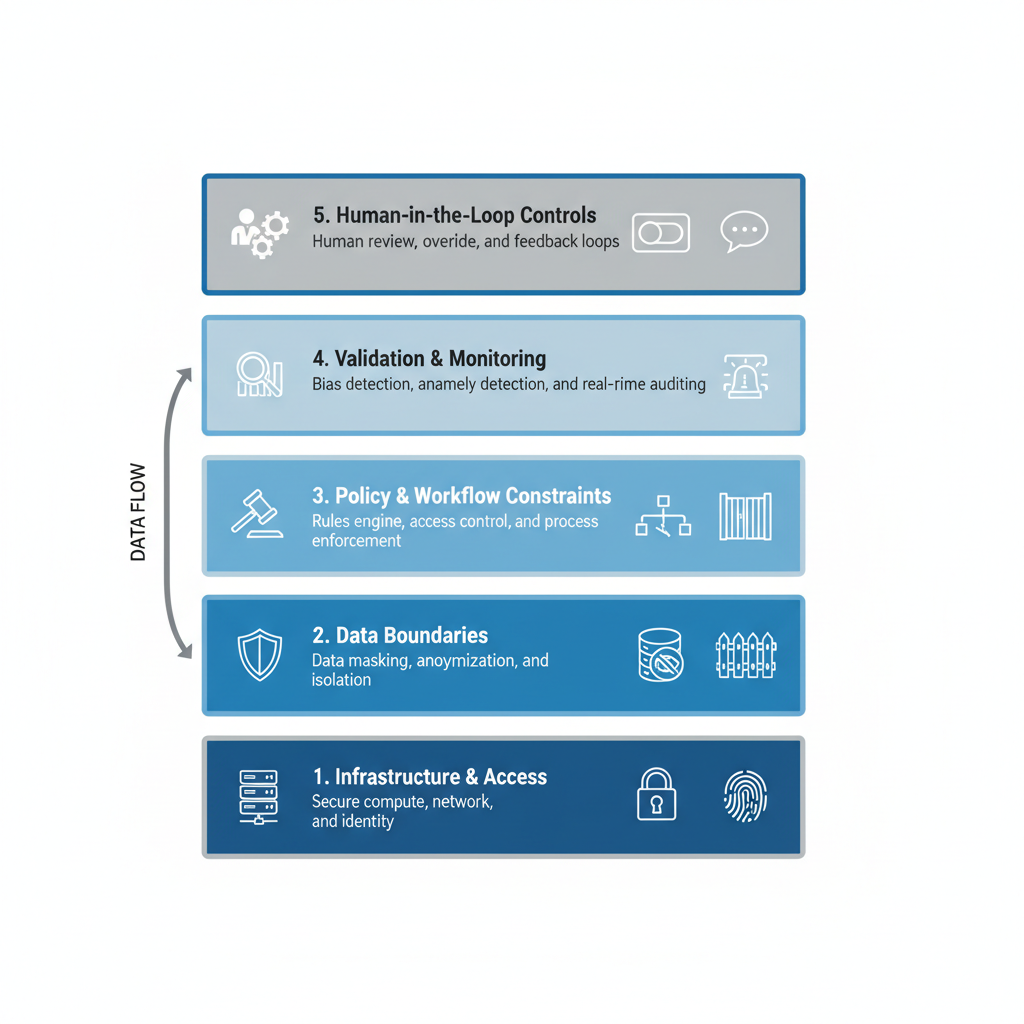
In a well-designed automation system, guardrails typically cover five layers working together:
Layer 1: Identity and Access
AI components must operate under clearly defined identities with the minimum necessary permissions. That means:
- Service accounts with scoped access, not personal logins
- Role-based access control that limits what AI can view or change
- Separate environments (dev/test/prod) so experimentation never touches live data
- Regular access reviews to ensure permissions haven’t drifted over time
If you wouldn’t hand full admin keys to a new junior employee, you shouldn’t hand them to an AI workflow either.
This is your foundation. Everything else depends on it.
Layer 2: Data Boundaries
Not all data belongs in a prompt.
Effective guardrails ensure:
- Sensitive fields (PII, financials, health-adjacent data, trade secrets) are masked, tokenized, or kept out of prompts entirely
- Context windows are carefully curated—AI sees what it needs to perform a task, not an entire database
- Logs exclude or sanitize sensitive content while still preserving enough detail for audits
- API calls and external integrations use separate credentials that cannot escalate to critical systems
This is the difference between “AI has access to the entire customer table” and “AI can only see non-sensitive attributes for customers assigned to this process.”
Layer 3: Policy and Workflow Constraints
AI should not be allowed to rewrite your business rules on the fly.
Guardrails here include:
- Hard limits on what actions an AI step can take (e.g., “draft invoice only,” never “send invoice”)
- Required human approvals for high-impact changes (pricing, discounts, contract terms, infrastructure changes)
- Explicit business policies encoded as pre-checks (“don’t approve refunds over $5,000 without manager sign-off”)
- Immutable audit trails that record not just what was done, but who approved it and why
Think of AI as a powerful assistant, not an unbounded decision-maker.
Layer 4: Validation, Monitoring, and Logging
The most dangerous AI errors are the ones no one notices until a customer complains.
Strong guardrails build in:
- Automatic validation checks before actions are executed (sanity checks on totals, dates, status values, ranges)
- Real-time dashboards and alerts when AI-assisted workflows behave unusually (spike in volume, error rates, or rejections)
- Detailed logs that record: what prompt was used, which context retrieved, what the model responded with, which actions were taken, and who validated it
- Observability hooks that allow teams to trace failures back to their root cause
This allows teams to review, debug, and continuously tighten their AI usage—rather than guessing what went wrong.
Layer 5: Human-in-the-Loop Controls
The goal is not to remove people. The goal is to reserve their judgment for the moments that matter.
Practical human guardrails include:
- Review queues where AI-generated outputs (emails, proposals, content) must be approved before sending
- Manual approval steps for changes that affect money, contracts, infrastructure, or customer-visible outcomes
- Clear escalation paths when AI is uncertain or encounters conflicting rules
- Confidence thresholds that automatically pause workflows when AI confidence drops below a defined level
- One-click override capability so reviewers can correct AI suggestions without friction
AI should handle the repetitive and predictable. Humans should handle exceptions, interpretation, and accountability.
The Architecture of Failure: What Happens Without Guardrails
Organizations that rush AI into automation without structure tend to run into predictable failure modes. Understanding these patterns is the first step in preventing them.
Failure Mode 1: Shadow AI Usage
Employees connect personal AI tools (ChatGPT, Claude, Gemini) to spreadsheets, CRMs, or inboxes, bypassing corporate policies entirely. There is no central visibility into:
- What data is leaving the organization
- How decisions are being made
- Whether prompts contain sensitive information
- Whether outputs are being validated
Consequence: Data leakage, compliance violations, inconsistent decision-making. One organization had researchers use ChatGPT to analyze customer support tickets containing PII. That data is now part of training datasets. If a regulator asks, there’s no record and no control.
Failure Mode 2: Unbounded Prompts
Workflows send entire records—including sensitive fields—directly to third-party models “for convenience.” Examples include:
- Full customer records fed to APIs to draft emails
- Complete financial records sent to generate reports
- Trade secret information included in prompts for analysis
Consequence: Even if data is not breached, this violates GDPR (if customer data is involved), HIPAA (if health data is involved), and creates measurable compliance exposure.
Failure Mode 3: AI as Hidden Decision-Maker
Teams forget which processes rely on AI. A model update or prompt change silently shifts how decisions are made, and no one notices until an outcome changes—sometimes catastrophically.
Consequence: A fraud detection system is updated by an ML engineer and begins flagging legitimate transactions as suspicious. Sales teams complain about false positives for weeks before anyone realizes the model changed. By then, customer trust is eroded and revenue is down.
Failure Mode 4: No Rollback Plan
AI is granted the ability to create, update, or delete critical records—but there are no checkpoints, no versioning strategy, and no clear way to revert bad actions at scale.
Consequence: An AI agent misinterprets a workflow rule and deletes 500 vendor records instead of archiving them. No backups. No undo. The procurement team spends weeks manually rebuilding the database.
Failure Mode 5: Automation Bias
Human reviewers over-trust AI outputs and stop scrutinizing them. They accept recommendations without checking whether they fit the specific situation. This is subtle and dangerous.
Consequence: A customer service AI proposes a refund. The human agent approves it without reading the context. The customer was actually a known fraudster, and the “issue” the AI identified was fabricated. Over time, these bypasses compound into systemic errors.
Failure Mode 6: Broken Handoffs
In workflows where AI hands off to humans (or to other systems), critical information gets lost. The AI escalates a case without transferring conversation history. An RPA bot fails to confirm task completion back to the AI that triggered it.
Consequence: Customers are forced to repeat themselves. Duplicate efforts happen silently. The automation ROI plummets because the “time saved” is eaten up by rework.
Failure Mode 7: Model Drift
AI performance degrades over time due to changes in data patterns, business rules, or language use. A chatbot trained on last year’s product catalog flounders with new releases. A fraud model based on outdated attack patterns misses real threats.
Consequence: Performance degrades silently until something breaks. By then, weeks of bad decisions have already happened.
Risk-Based Guardrail Routing: Matching Protection to Stakes
Not every AI decision needs the same level of protection. A system that validates every response synchronously will add latency that kills user experience for low-risk tasks. But a system with no guardrails for high-risk decisions invites disaster.
The production solution is risk-based routing: dynamically adjusting guardrail intensity based on what the AI is about to do.
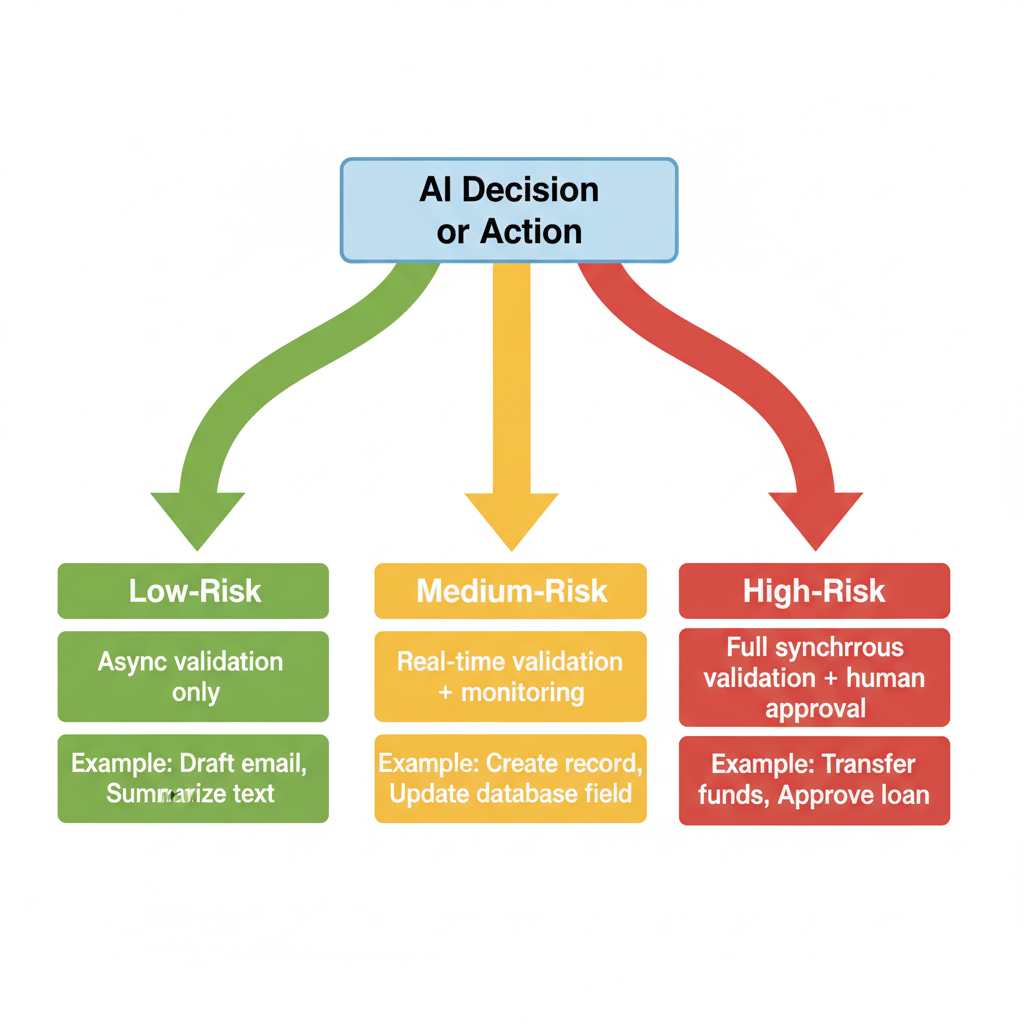
Low-Risk Actions
Examples: Drafting an email, summarizing a document, classifying incoming support tickets
Guardrail response: Asynchronous validation. The AI completes the action. You validate it before it goes out. If there’s an error, you catch it and correct it.
Latency cost: Minimal (validation happens in the background)
Human involvement: Light (review queue, one-click corrections)
Medium-Risk Actions
Examples: Creating a new customer record, updating a billing amount, changing system configuration
Guardrail response: Real-time validation + monitoring. The AI proposes an action. Immediate validation checks run (syntax, business rules, ranges). If checks pass, the action executes. If they fail, human review is triggered.
Latency cost: Moderate (validation adds 100-500ms)
Human involvement: Triggered only on exceptions
High-Risk Actions
Examples: Approving a large refund, transferring funds, deleting records, changing security settings, modifying contracts
Guardrail response: Full synchronous validation + mandatory human approval. The AI proposes an action. All guardrail layers run to completion. Only after every check passes does a human review and explicitly approve. Only then does the action execute.
Latency cost: High (full guardrail latency can add 1-3 seconds)
Human involvement: Required. Always.
Why Guardrails Increase ROI, Not Just Reduce Risk
On the surface, guardrails can look like friction. Leaders ask: “If we have to approve everything, aren’t we giving up the speed AI promised?”
The reality is that, over the life of the system, guardrails increase ROI rather than reduce it.
1. They Prevent Expensive Rework
Fixing dozens of incorrect invoices, rebuilding corrupted data, or restoring a broken system is much more expensive than approving a queue of AI-drafted items.
Example: A workflow that drafts 100 customer emails per day. With guardrails, a human reviewer spends 30 minutes approving batches. Without guardrails, 5 emails contain errors that upset customers. Each upset customer takes 20 minutes to re-contact and appease. That’s 1.5+ hours of damage control per day—far exceeding the review time.
Guardrails front-load small, predictable review steps to avoid large, unpredictable cleanup work.
2. They Protect Customer Trust
Automation and AI are invisible to your customers—until something goes wrong.
A single AI-generated mistake in a sensitive context (billing, legal terms, medical-adjacent information) can erode years of trust. Strong guardrails ensure your brand experience remains consistent even as more work moves behind the scenes.
3. They Enable Scale Without Losing Control
Automation can save 40+ hours weekly and decouple volume from headcount. But scale without governance simply multiplies the potential damage.
Guardrails let leaders say “yes” to scaling AI-assisted workflows across departments while still answering critical questions:
- Who approved this change?
- Which system made this decision?
- What data did the AI see?
- How do we roll back if something goes wrong?
Without those answers, you’re not running an operation—you’re running an experiment.
4. They Reduce Compliance Risk and Fines
Organizations operating in regulated industries (healthcare, finance, EU/GDPR jurisdictions) face fines measured in millions for data breaches and compliance violations. Strong guardrails document that you took reasonable steps to protect data and maintain governance.
This is not just risk reduction. It is risk insurance.
Building Guardrails Into Your Automation from Day One
Guardrails are most effective when they are built into the automation architecture, not bolted on after something breaks.
For a growing business, a practical approach looks like this:
Step 1: Map Your Risk Landscape
Identify:
- Which workflows will touch which systems
- Which automation candidates are high-volume, high-sensitivity, or both
- Where sensitive data and high-impact decisions live
- Which outcomes must never be delegated fully to AI
This mirrors the architecture-first approach used in well-designed automation programs: fix the foundation before you accelerate.
Step 2: Define Clear AI Roles
Decide where AI will:
- Only analyze (classification, summarization, trend detection)
- Propose (drafting content or actions for review)
- Execute (take constrained actions with automatic validation)
Do not mix these roles casually. A model allowed to both propose and execute without guardrails is effectively making unbounded business decisions.
Step 3: Implement Permission Boundaries
Give AI components:
- Minimal privileges required to complete their specific tasks
- Separate service accounts per workflow or domain
- Well-defined APIs and contracts, rather than direct database access
- Explicit denial of dangerous capabilities (no delete-all, no bulk-modify without approval)
This drastically reduces the impact of any single failure.
Step 4: Build Human Review Into the Workflow
Identify knife-edge decisions where a human must stay in the loop:
- High-value deals
- Pricing deviations
- Policy exceptions
- Infrastructure or security changes
- Any outcome visible to customers or affecting revenue
Design the workflow so AI does the heavy lifting—drafting, analyzing, pre-populating forms—while humans make the final calls.
Step 5: Instrument for Observability
Treat AI usage as a living system, not a one-time project:
- Instrument workflows with metrics: how many requests, how many passed validation, how many required human override
- Set up alerts for: unusual volumes, error spikes, confidence drops below thresholds
- Log sufficiently: what prompt was used, which data was retrieved, what the model output, what actions were taken
- Review logs regularly for surprising outputs or edge cases
Step 6: Establish Feedback and Iteration
Use monitoring data to tighten guardrails over time:
- When validation catches an error, investigate whether the guardrail needs to be stricter or the prompt clearer
- When humans override AI decisions, ask: could we have prevented this with better validation?
- When the system works well, ask: could we reduce manual review here without increasing risk?
Guardrails should get sharper over time, not looser.
A Production Implementation Checklist
If you’re building or extending AI automation, use this checklist to ensure guardrails are baked in:
Architecture & Access
- AI components run under service accounts, not personal logins
- RBAC in place: AI has minimum permissions needed for its specific role
- Separate environments (dev/test/prod) with different access credentials
- Regular access reviews: has AI’s permission scope drifted over time?
Data Governance
- Inventory of sensitive data types (PII, financial, IP, regulated)
- Data masking/tokenization implemented before prompts go out
- External API calls do not include sensitive data without explicit review
- Logs sanitized: sensitive data is not stored in plaintext in logs
Policy & Validation
- Business rules documented and encoded as guardrails (not just in prompts)
- Hard limits on action scope (max refund amount, max records affected, etc.)
- Approval gates defined for high-impact decisions
- Immutable audit trail: every action logged with timestamp, actor, approval status
Monitoring & Alerting
- Dashboards show: request volume, pass/fail rates, error types
- Alerts configured for: volume spikes, error rate increases, confidence drops
- Logs centralized and searchable for forensics
- Regular log review (weekly minimum) for anomalies
Human-in-the-Loop
- Review workflows designed: intuitive, low-friction, one-click corrections
- Escalation paths clear: when does a high-risk action require manager sign-off?
- Confidence thresholds documented: at what AI confidence level does human review kick in?
- Training in place: reviewers understand their role and the risks they’re guarding against
Testing & Iteration
- Load testing: does the system handle peak volume without timing out?
- Red team exercises: can you break the guardrails? What happens when you try?
- Feedback loops in place: humans can report issues, improvements are prioritized
- Regular review: are guardrails still appropriate, or have business conditions changed?
Guardrails as a Competitive Advantage
Organizations that adopt AI with strong guardrails are positioned to move faster than competitors who chase quick wins without structure.
They can:
- Confidently expand automation from a single department to an organization-wide platform
- Offer faster response times and better customer experiences without sacrificing reliability
- Prove compliance and governance in industries where trust and regulation are non-negotiable
- Onboard new employees into clear, documented workflows instead of tribal knowledge and ad-hoc scripts
- Scale without adding proportional headcount or complexity
In other words, guardrails are not about slowing down AI—they are what allow AI to become part of an enduring, scalable operating system rather than a risky side experiment.
Bringing AI Guardrails Into Your Automation Roadmap
If your business is already exploring or using AI in automation, a useful next step is to audit your current state.
Questions to ask:
- Which workflows already rely on AI, even informally?
- Where is sensitive data flowing into prompts or external tools?
- Do AI components have more permissions than they strictly need?
- Are there any AI-driven actions happening without human visibility or approval?
- If something breaks, how would we know? How would we fix it?
- Can we explain to a regulator or auditor how our guardrails work?
From there, you can prioritize:
- Immediate action: High-risk workflows (data exposure, regulatory risk, high financial impact) for guardrail implementation
- Near-term: High-volume, low-risk workflows where faster AI expansion makes sense but with light governance
- Strategic: Long-term architectural changes to unify identity, logging, access control, and observability
The goal is not to pause AI until everything is perfect. The goal is to bring AI under the same disciplined architecture that already governs your most critical systems.
The Connection to Your Broader AI Strategy
Guardrails also shape your choices about where AI runs. Are you using public ChatGPT, third-party APIs, or sovereign AI? Each deployment model has different guardrail implications.
A companion post explores how your deployment choice (public chat tools, secure APIs, or sovereign AI) interacts with guardrails architecture. For now, the key insight is: no matter which deployment model you choose, guardrails remain non-negotiable.
Final Thought
If you want your AI initiatives to save 40+ hours weekly and stand up to real-world risk, start with guardrails. They are not a constraint on innovation. They are what make innovation safe enough to run every day.
The organizations that win are not moving fastest. They’re moving intelligently, with visibility, control, and the ability to scale without losing their shirt.
Guardrails let you do that.
Key Takeaways
- AI guardrails in business automation are essential to prevent data leakage and costly mistakes.
- Effective guardrails include identity control, data boundaries, policy constraints, validation mechanisms, and human oversight.
- Implementing risk-based routing helps match guardrail intensity to the risk of the action being performed.
- Guardrails not only reduce risks but also increase ROI by preventing expensive rework and protecting customer trust.
- Organizations that adopt AI guardrails can scale effectively while maintaining control and ensuring compliance.
Ironwood Logic specializes in secure, scalable AI automation for small businesses. We build unified AI and workflow automation architectures that eliminate manual work, reduce errors, and enable growth without proportional headcount increases. Learn how companies are saving 40+ hours weekly and reducing operational costs by 30%+ with automated workflows.